![Takeru Eye Clinic | Takatori Shopping Street, Sawara-ku, Fukuoka City [Nishijin Station / Fujisaki Station]](https://takeru-eye.com/wp-content/uploads/2022/10/takeru_logo_for-WP-header.png)

The term “VDT” had stopped being used.
The “VDT Guidelines” were formulated in 2002 (Heisei 14).
As IT has advanced, they are now called the Information Device Guidelines, I am told.
They were updated in 2019 (Reiwa 1).
About the Guidelines for Occupational Health Management in Information Device Work
https://www.mhlw.go.jp/content/000539604.pdf
- Refraction test
- Uncorrected visual acuity, corrected visual acuity, and near visual acuity tests
- Accommodation function test
- Eye pressure test
- Eye alignment test
- Dry eye test
- Slit lamp microscope examination
We carry out the necessary check-ups (VDT check-ups) in line with the new “Information Device Guidelines.”
Company health check-ups (eye check-ups)
We will coordinate the schedule with the person in charge.
Please feel free to contact us at any time.
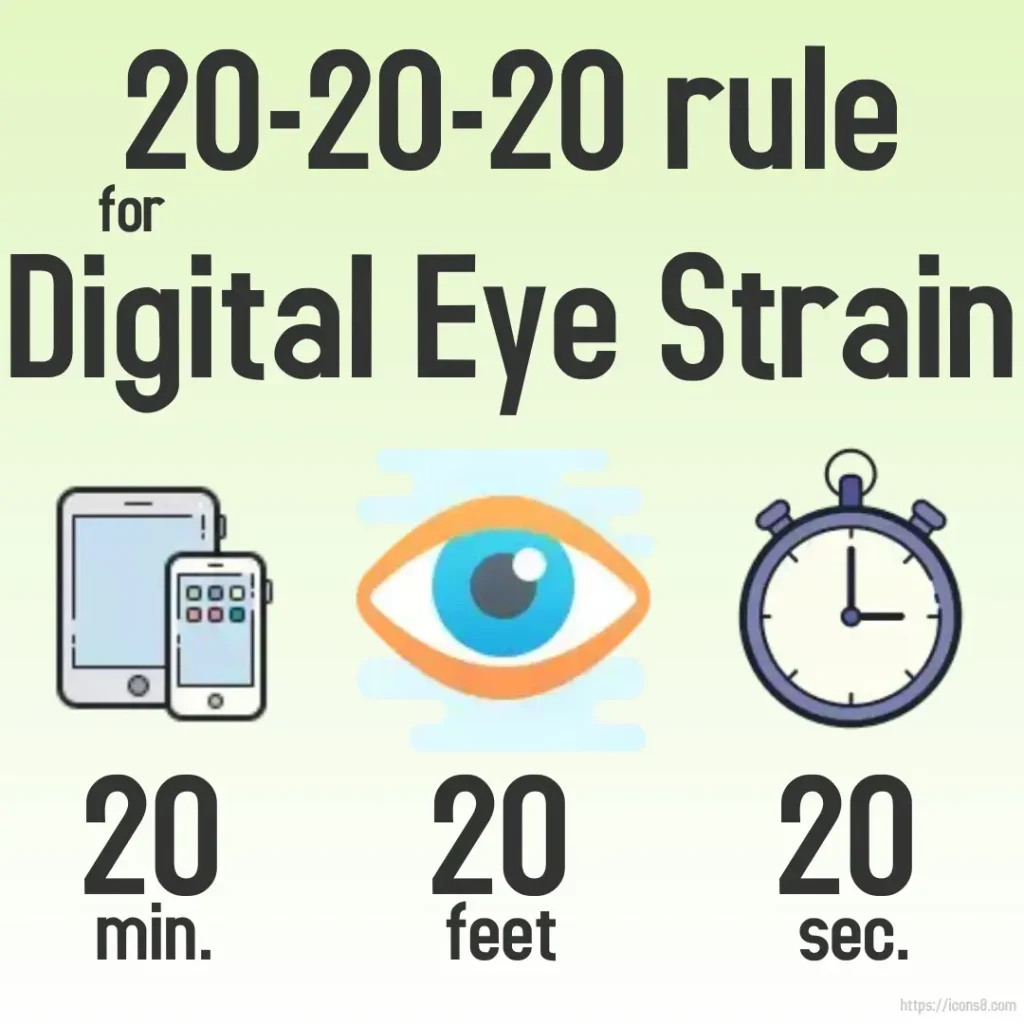
On some ThinkPad models, a mode that supports the 20-20-20 rule can be set.
The VDT Guidelines have been abolished and replaced by the “Information Device Guidelines.”

“About the Guidelines for Occupational Health Management in VDT Work” (2002)
Heisei 14 (2002)
“About the Guidelines for Occupational Health Management in VDT Work”
VDT Guidelines / Notice No. 0405001 of the Labour Standards Bureau
Afterward, through technological innovation in both hardware and software, IT adoption in the workplace advanced further.
Specifically,
- an increase in workers engaged in information device work,
- the spread of information device work across a wide range of ages, including older workers,
- the diversification and improved functions of mobile information terminals,
- the diversification of input devices, such as the spread of touch panels,
- the spread of wearable devices,
and other changes took place.
3.–5.: The text assumed a style of work in which people concentrate on work at a desk using a desktop or laptop computer.
Today, the state of individuals’ internet-use devices is
PC < smartphone,
and the types of information devices used and how they are used have diversified.
The guidelines were reviewed.
・The term VDT is not generally familiar
・A wide variety of devices are used in workplaces
The term “VDT” was replaced with “information device,”
and the Guidelines for Occupational Health Management in Information Device Work
were established.
Notice No. 0405001 of the Labour Standards Bureau, dated April 5, Heisei 14
The “VDT Guidelines” have been abolished.
About the Guidelines for Occupational Health Management in Information Device Work (2019)
About the Guidelines for Occupational Health Management in Information Device Work
(July 12, Reiwa 1)
(Notice No. 3 of 0712, Labour Standards Bureau)
(Notice from the Director-General of the Labour Standards Bureau, Ministry of Health, Labour and Welfare, to the heads of prefectural labour bureaus)
d. Ophthalmological tests
(a) Visual acuity tests
i. Distance visual acuity test: test in the refractive state used for ordinary distance viewing (such as when walking outdoors) (uncorrected, glasses, or contact lenses).
ii. Near visual acuity test: test in the refractive state used during ordinary work (uncorrected, glasses, or contact lenses). Normally, 50 cm visual acuity is measured, but if the usual information device working distance is shorter, it is desirable to measure 30 cm visual acuity. The purpose of the near visual acuity test is to give guidance so that visual acuity corresponding to the viewing distance of the display is at an appropriate level, and it is desirable for near visual acuity, as monocular acuity (uncorrected or corrected), to be about 0.5 or better in both eyes.
(b) Refraction test
For those who are uncorrected or wear glasses, the refractive state without correction is measured with an autorefractometer.
For contact lens wearers, measurement is done without lenses if they can be removed, and with the lenses in if that is difficult.
In addition, the power of the glasses in use is measured with a lensmeter. For contact lens wearers, ask about the power of the lenses in use if possible.
If the test results show that sufficient visual acuity is not obtained in the current state of correction and at the information device working distance, the worker should be advised to see an ophthalmologist before being assigned to the work.
Where the interview reveals no particular abnormality and 5 m visual acuity and near visual acuity are both maintained at about 0.5 or better in each eye (uncorrected or corrected), the refraction test may be omitted.
(c) Eye alignment test and accommodation function test: for eye alignment, test for the presence of heterophoria with the alternate cover test or a visual acuity tester with eye alignment testing. For the accommodation function test, measure the near point distance in the state of correction in which information device work is usually done.
Advanced ophthalmological tests other than (a) to (c) above should be requested from a specialist.
In addition, because dry eye may develop symptoms through information device work, if the interview reveals complaints of dryness, a foreign body sensation, pain, or intermittent blurred vision, advise a visit to a specialist according to the severity.
Factors that worsen dry eye include contact lens wear, low humidity, air blowing directly on the eyes, opening the eyelids excessively when looking upward because the display screen is too high, and reduced blinking from staring at a screen that is hard to read; with these in mind, improve the work environment and provide health guidance.
Quoted from “About the Guidelines for Occupational Health Management in Information Device Work”
Preparing the work environment when working remotely at home, etc.
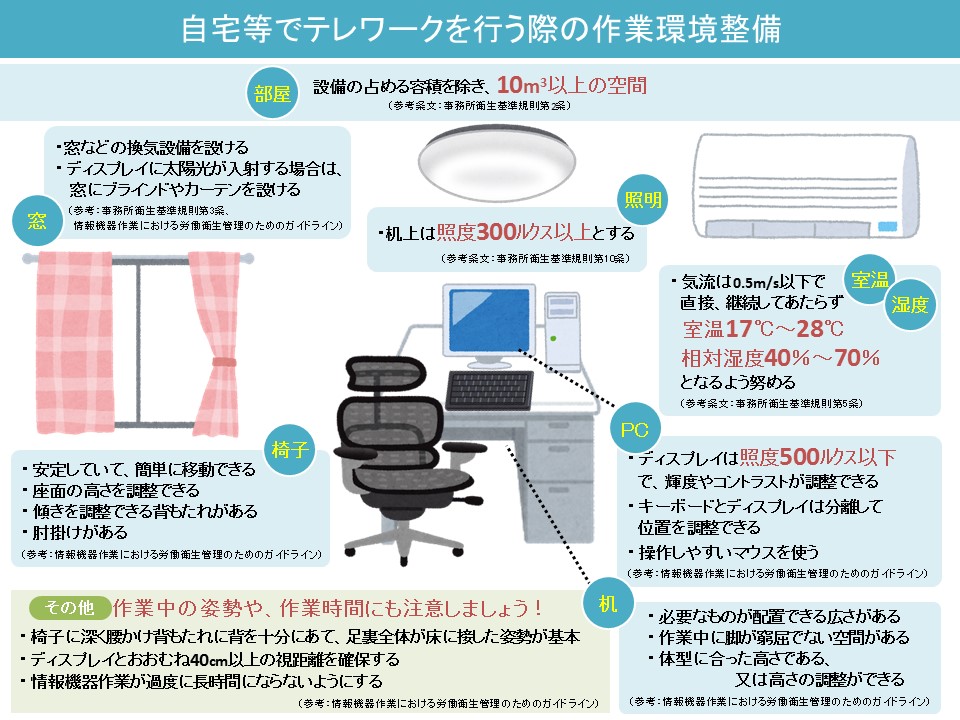
The website of the Ministry of Health, Labour and Welfare had an easy-to-understand diagram.
・Image of work environment preparation when teleworking at home, etc. [PDF file: 367 KB]
・Image of work environment preparation when teleworking at home, etc. [PPTX file: 483 KB]

From Visually.